Personal budgeting · Android & web

Budgeting that’s kind to you.

See your accounts, bills, budgets and goals in one calm place. Start free on your phone with no account needed, and add bank sync when you’re ready.

Get launch news Coming soonon Google Play

Android and web first. Manual budgeting is free forever.

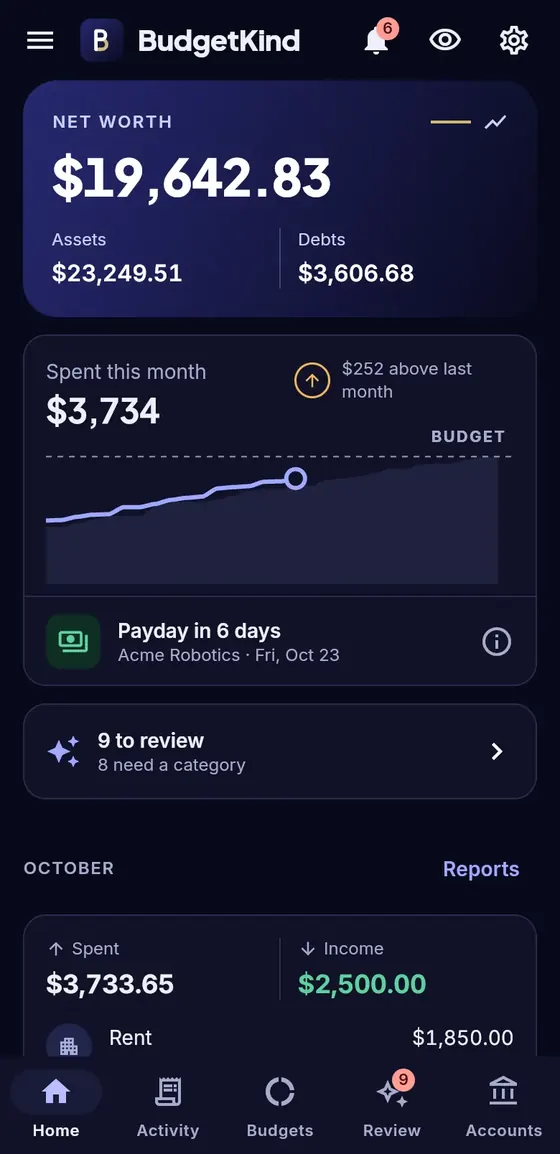
BudgetKind Home screen: net worth, spending this month against budget, next payday and items to review.
Real app screens, shown with demo-mode sample data.

What it does

Everything you need to feel on top of money

No dashboards to configure. BudgetKind sorts your spending, spots what repeats and points out where money slips away.

Budgets that keep pace with you

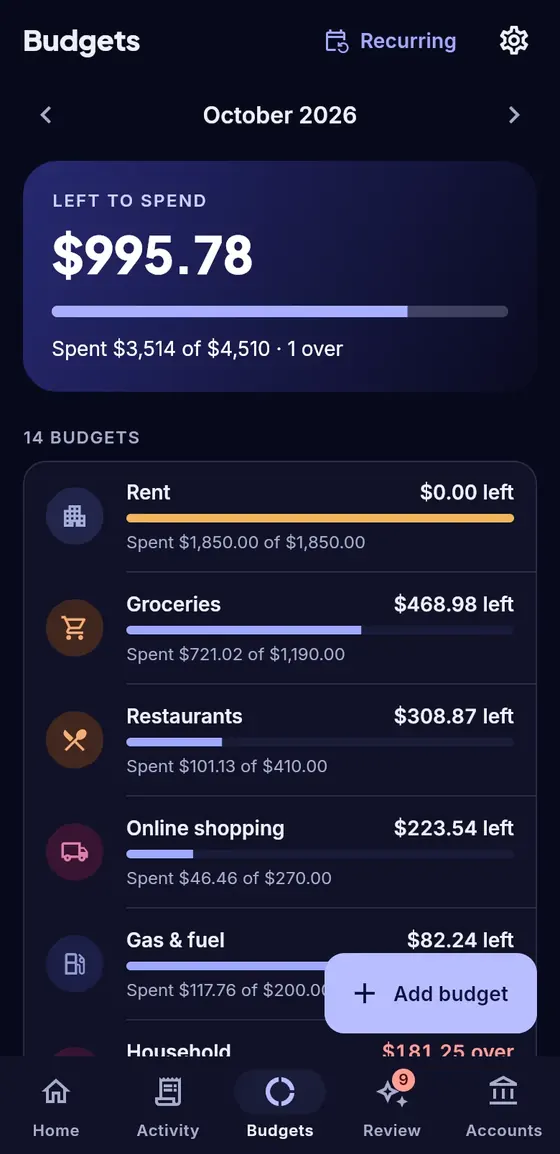
Set a monthly amount per category, or let BudgetKind suggest one from your recent spending.

  • “Left to spend” at a glance, with how this month compares to last
  • Categories over budget stand out, and repeat offenders show up as leaks
  • Splits and tags, so one Costco run can count as groceries and household
Budgets screen showing $995.78 left to spend this month and progress bars for rent, groceries, restaurants and gas.

Bills and subscriptions, found for you

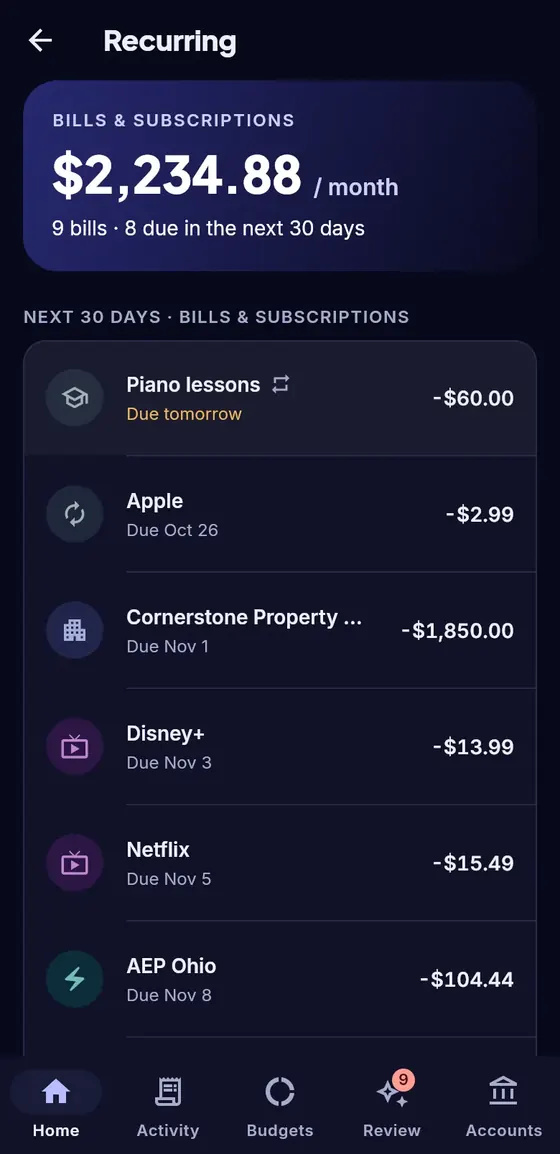
BudgetKind spots charges that repeat (rent, utilities, streaming, paychecks) and shows what’s due next.

  • Your monthly total for bills and subscriptions
  • Upcoming 30 days, so nothing sneaks up on you
  • Optional reminders and price-increase alerts
Recurring screen showing $2,234.88 a month in bills and subscriptions and the next ones due.

See where your money leaks

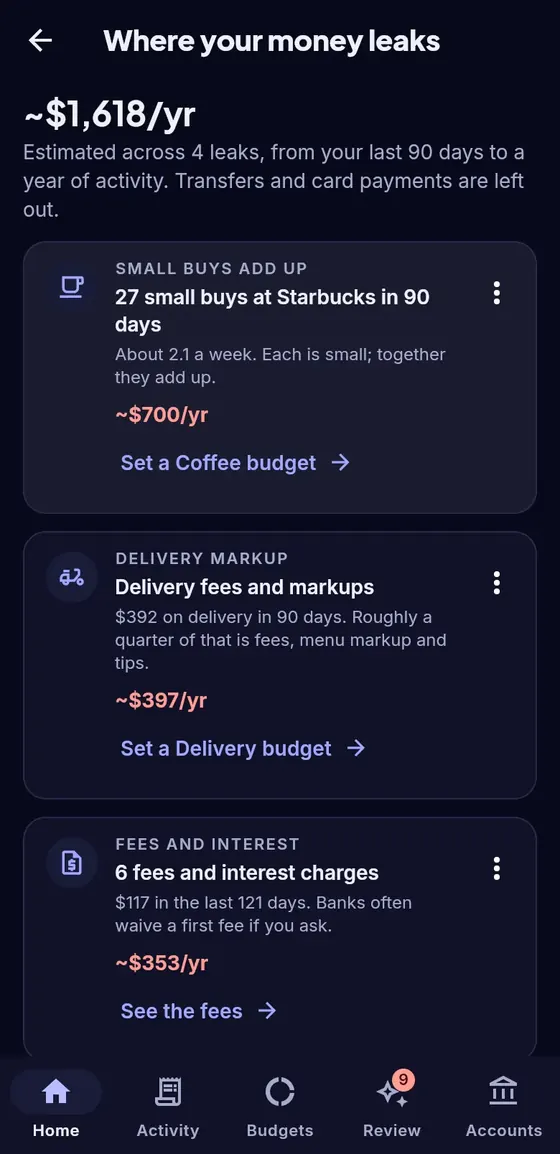
Small habits add up. BudgetKind estimates what they cost you per year and suggests one simple next step.

  • Frequent small purchases, delivery markups, fees and interest
  • Subscriptions you may not use, side by side
  • Not a leak? Dismiss it. BudgetKind never cancels anything for you
Where your money leaks screen estimating about $1,618 a year across small buys, delivery fees and bank fees.

Goals that track themselves

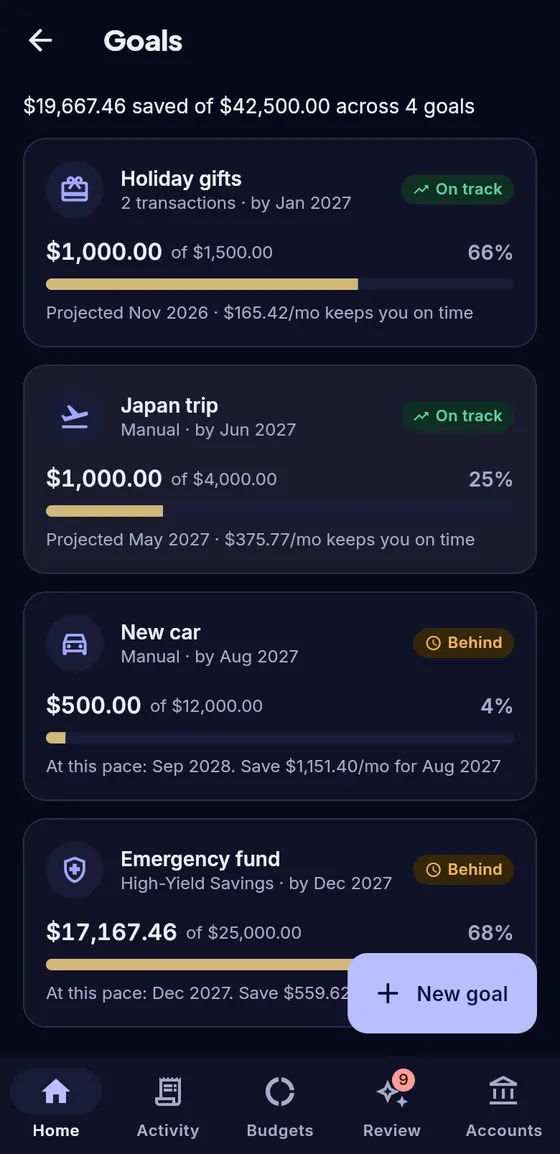
Save for a trip, a car or a safety net, and see whether you’re on pace.

  • Follow a savings account balance, log contributions yourself, or count matching transfers
  • How much per month keeps you on time
  • Projected finish date based on your recent pace
Goals screen with holiday gifts and a Japan trip on track, a new car behind schedule and an emergency fund following a savings account.

A quick review instead of a chore

Most transactions are categorized for you. The rest wait in one short list.

  • Rules learn from your choices: fix it once, it’s right next time
  • Possible duplicates and transfers flagged, not double-counted
  • PayPal, Venmo and Amazon payments matched to the bank charge
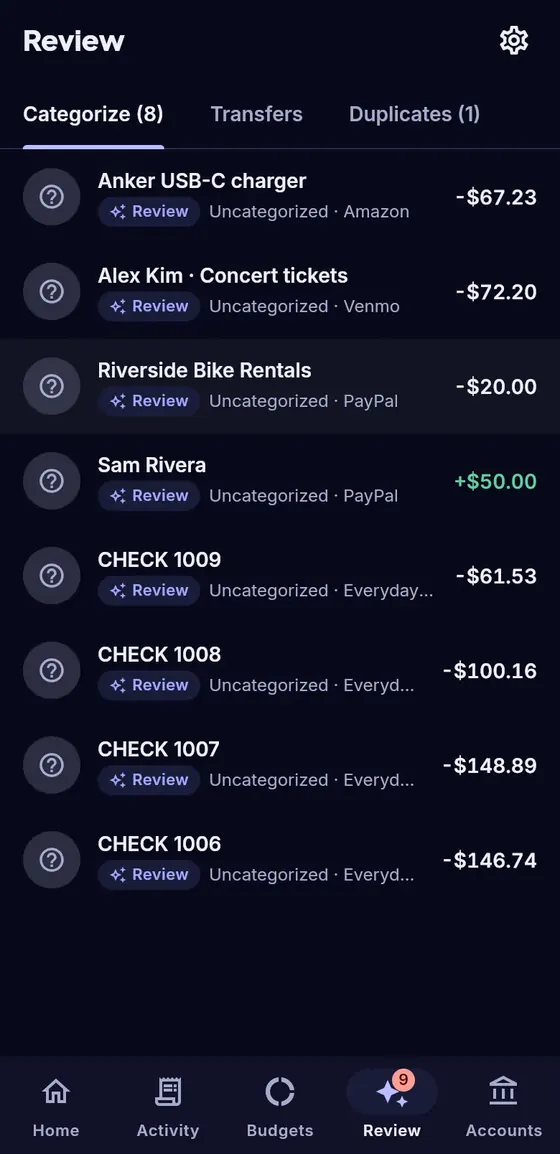
Review screen listing uncategorized transactions from Amazon, Venmo and PayPal with suggested categories.

Import any statement

CSV, Excel, PDF, OFX or QIF, including Chase PDFs. Files are read on your device.

Net worth and reports

Assets minus debts over time, and spending by category, merchant or month.

Helpful alerts

Bills due, large charges, low balance and payday. You choose which ones.

Try it with sample data

Demo mode lets you explore every feature first. It never touches your own data.

Private by design

Your money is your business

BudgetKind is paid for by subscriptions, not by your data. No ads, ever.

Your files never leave your device

Statements you import are read on your phone or in your browser. The file itself is never uploaded, and PDF passwords are never saved.

Free plan: on your device only

Manual budgeting needs no account. Your budget lives on your phone and nowhere else.

Read-only bank access via Plaid

With Plus, banks connect through Plaid. BudgetKind can see balances and transactions but can’t move money, and never sees your bank password.

We never sell your data

No selling, no ad networks, no analytics SDKs in the app. Disconnect a bank or delete your data whenever you like.

Read the privacy policy

Pricing

Free to start. One honest price for more.

Manual

Free forever

No account, no card.

  • Unlimited manual accounts
  • Statement import (CSV, Excel, PDF, OFX, QIF)
  • Budgets, bills and subscriptions, leaks
  • Goals, reports and net worth
  • Rules, splits and tags
  • Stays on your device
Plus

$4.99 / month

or $39.99 / year (about $3.33 a month). 14-day free trial.

  • Everything in Manual
  • Read-only bank sync through Plaid
  • Linked accounts kept in sync through our US cloud
  • Cancel anytime in Google Play or online
Coming soon

Household for 2. Share selected accounts, a household budget and goals with a partner at no extra cost. Each person keeps their own login.

Prices in US dollars. Subscriptions aren’t on sale yet; the trial and prices apply from launch. Bank sync covers US institutions supported by Plaid.

FAQ

Questions, answered

Is BudgetKind really free?

Yes. Manual budgeting (adding accounts yourself and importing statements) is free forever, with no ads. Plus will be an optional subscription for bank sync.

Do I have to link my bank?

No. You can add accounts by hand or import the statements your bank already gives you. Linking is there when you want it to stay up to date by itself.

Is it safe to connect my bank?

Banks connect through Plaid. You sign in on your bank’s own page or in Plaid’s secure window; BudgetKind never receives your bank password. Access is read-only: BudgetKind can see balances and transactions but can’t move money. You can disconnect at any time.

Where is my data stored?

Your budgets, categories, rules and goals stay on your device. If you link a bank, you create a cloud account, and your email address and the bank data from Plaid (accounts, balances and transactions) are stored in our cloud database, hosted with Supabase in the US, so the app can keep them up to date. See the privacy policy.

When can I get it?

BudgetKind is in testing now and coming first to Android (Google Play) and the web. An iPhone version is planned after that. Email us and we’ll let you know when it’s ready.

Can I try it before adding my own data?

Yes. Demo mode fills the app with realistic sample data so you can try every feature. It’s kept completely separate from your own data and resets each time.

Which banks work?

Statement import works with any bank that offers CSV, Excel, PDF, OFX or QIF downloads. Bank sync (Plus) covers US banks and card issuers supported by Plaid.

How do I delete my data?

In the app: Settings › Your data lets you delete everything on your device and, if you have one, your cloud account. Linked banks can be disconnected from the account screen. Without the app, see how to delete your account.

Is BudgetKind a bank or financial advisor?

No. BudgetKind is a budgeting tool. It doesn’t hold money, move money, or give financial, tax or investment advice.

Be first to try BudgetKind

BudgetKind is in testing. Email us and we’ll write back once it’s on Google Play. We use your address only for that.
Email hello@vncntlabs.com